
Elipse Plant Manager
Elipse Plant Manager (EPM) is a powerful platform that drives the continuous pursuit of higher quality, lower costs, and greater operational efficiency. With EPM, you can collect data from different sources, then store and contextualize it. The platform delivers high write and query performance, along with a wide range of visualization and analysis tools that turn data into knowledge faster.

Features
Collection
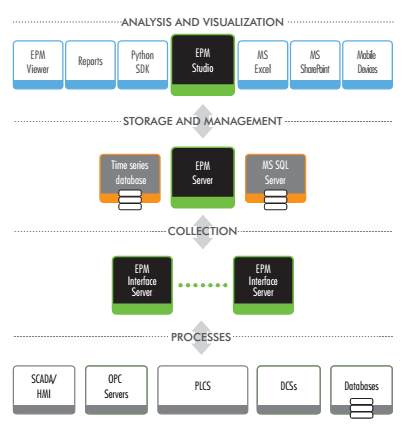
EPM Interface Server retrieves data at the source and can apply a compression algorithm before sending it to EPM Server for storage. Its store-and-forward mechanism ensures data integrity even after a connection loss. Available interfaces include OPC DA, Elipse Power, and Elipse E3, with more than 500 drivers for most devices on the market. Database interfaces such as Microsoft SQL Server®, Oracle Database®, and others are also available via OLE DB.
Storage and Management
EPM Server is the core of the platform. It manages and stores data as time series, which reduces disk space and provides high processing capacity and fast response to query and write requests. You can also create custom mechanisms for accessing and manipulating data with the EPM User API (.NET) or the EPM Python SDK, in expressions or Python applications. These mechanisms generate indicators or trends from calculations triggered by value changes or on a schedule. Elipse Plant Manager is also an OPC UA server, so other OPC UA clients can query real-time and historical series, including user-defined objects, annotations, and events.
Analysis and Visualization
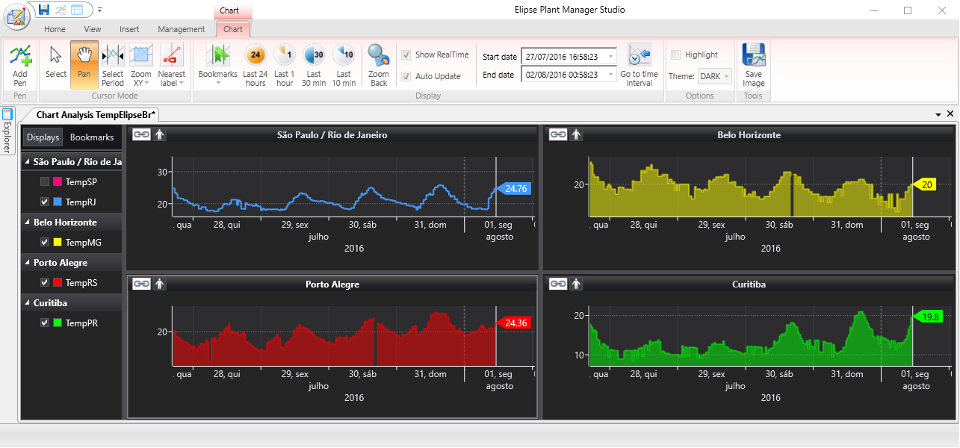
EPM analysis tools extract relevant information from process data for each level of the organization, making EPM the right platform for decision-making. The most common way to analyze and visualize data is with spreadsheets such as Microsoft Excel, through the EPM Add-in. Other tools can also be used:
- EPM Studio
- Elipse E3, Elipse Power, and EPM Viewer
- EPM Web Parts for Microsoft SharePoint corporate portals
- Microsoft SQL Server Reporting Services (SSRS) reports
- Mobile app (Android, iOS, and web)
Benefits
Faster decision-making
Multiple ways to track key performance indicators (KPIs) and faster analysis make decision-making more agile.
Accurate actions and process improvement
Operational indicators and predictions of control actions help managers act on the process more efficiently.
Higher profitability
Centralized information gives full operational visibility of your business, generating high-level performance indicators and real-time actions to correct deviations.
Flexible analysis
The integrated analysis environment includes several data analysis tools, from KPI calculations to actionable information. Python’s open-source libraries for time series, optimization, neural networks, fuzzy logic, SPC, and complex event processing, among others, sharply reduce the time needed to develop reports and gain insights.
Process availability
Continuous data analysis helps you plan stops and maintenance, keeping the process available and running at its best.
A single view of the whole process
With EPM interfaces and modeling tools, the whole team works from the same source of process data, eliminating isolated islands of information.
Architecture
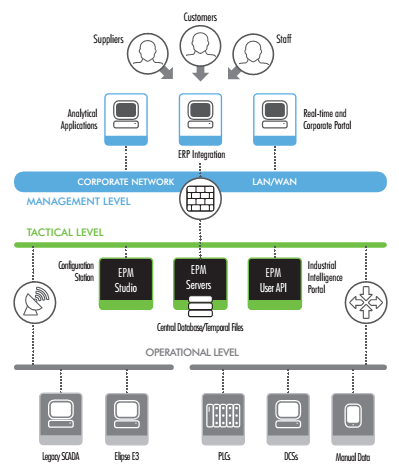
Elipse Plant Manager handles real-time and historical data from many types of processes and systems, as well as from utilities and infrastructure (power, water and wastewater, data centers, and smart buildings), enabling integration across all levels of the organization.
Tools
EPM Studio
An integrated tool for analyzing and visualizing data. It is also used to run, manage, and configure the entire EPM platform, creating a collaborative environment and lowering maintenance costs.
EPM Interface Server
Connects to data sources, preprocesses data, and sends it to EPM Server. Available interfaces include OPC DA, Elipse interfaces (E3 Gateway, E3 Server, and Elipse Power) with native redundancy, and databases (OLE DB).
EPM Add-in
Lets you use Microsoft Excel® as a query and analysis tool.
EPM Server
The core of the platform, responsible for storing and querying data, with native redundancy through clustering.
EPM Web Parts
Components for Microsoft SharePoint® corporate portals.
EPM Viewer
A multi-user environment for building real-time displays of operational and business data, based on Elipse E3 and integrated via OPC UA.
Available Packages
EPM Server
Includes one interface of each type (E3, Diagnostics, MQTT, OLE DB, OPC DA, and Simulator).
You can add packs of variables (tags), clients for simultaneous connections, and extra interfaces later. This lets you increase the number of variables that receive process data or KPI calculations, the number of interfaces, and access through visualization and analysis tools such as EPM Add-in for Microsoft Excel, EPM Studio, EPM Web API, Elipse Mobile, Elipse Trend Explorer, and third-party OPC UA clients.
EPM Historian
Available in 50-, 150-, 250-, 500-, 750-, and 1,000-tag versions, EPM Historian is ideal for projects taking their first steps toward digital transformation.
Add-on modules such as EPM Processor, EPM ODBC, and EPM Portal can be purchased separately to extend its functionality.
Please note that EPM Historian does not support additional tag packs or EPM Client users. To expand these resources, an upgrade to EPM Server is required.
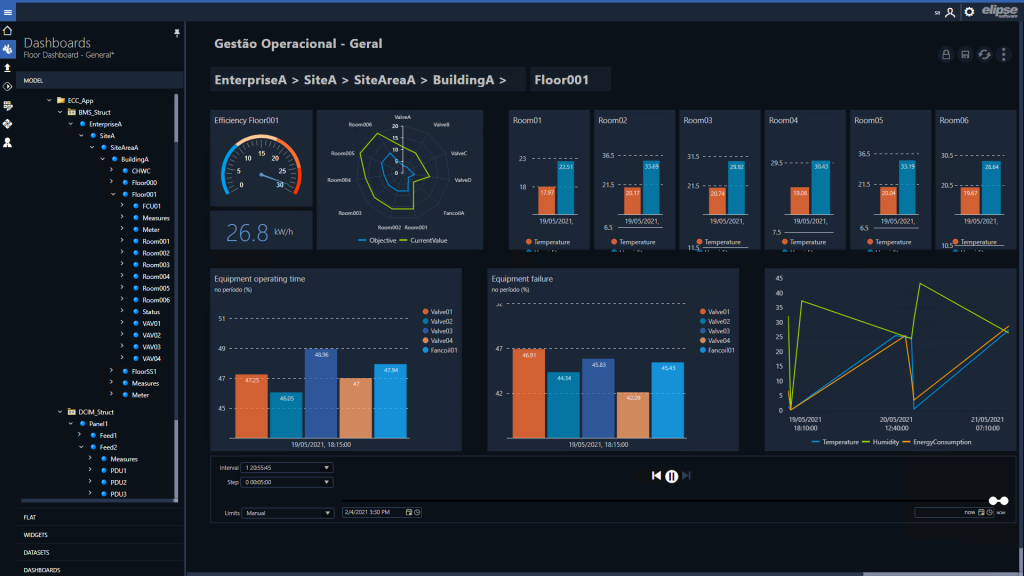
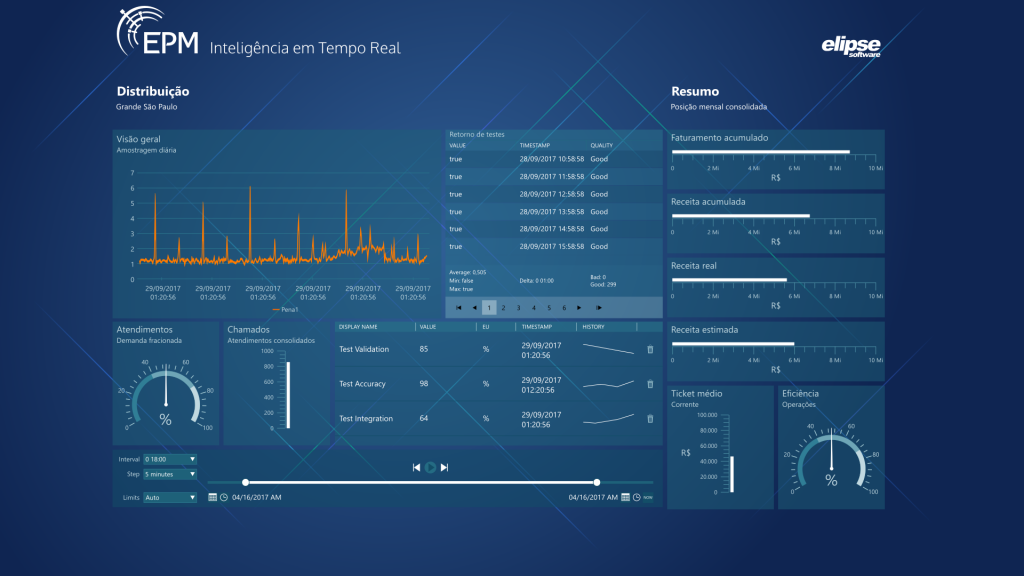
EPM Portal is a complete solution for processing and visualizing information through dashboards, for any segment that needs to consolidate and visualize process data. It supports industrial intelligence and analytics applications that improve decision-making and the entire production chain.
It also provides visual objects such as displays, line charts, bar charts, and gauges, among others.
EPM Portal makes information easier to access at every level of the organization, giving decision-makers more autonomy and flexibility.
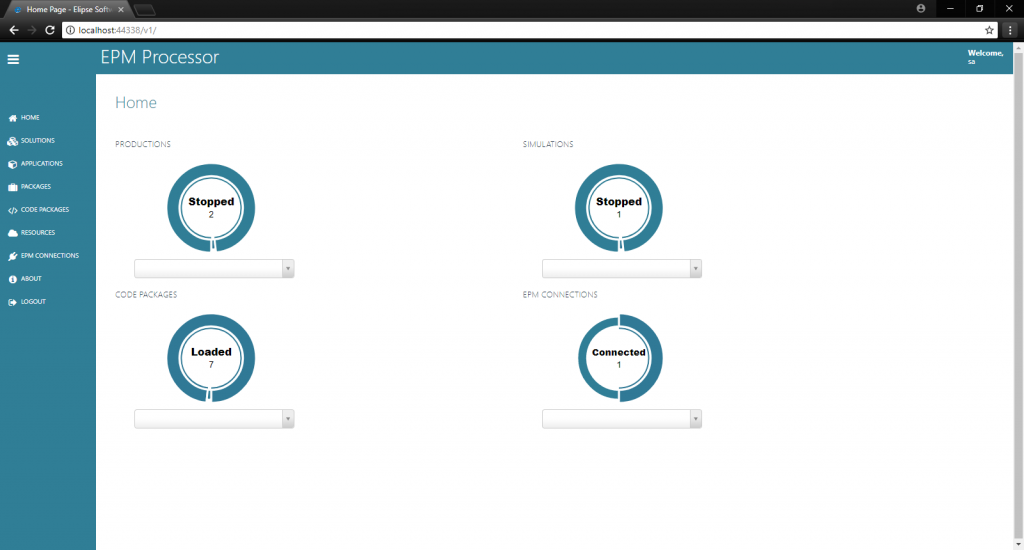
EPM Processor is a module integrated with Elipse Plant Manager (EPM) that runs Python code triggered by simulated or real-time events. With it, you can retrieve, organize, analyze, share, and monitor data not only from the process but also from many other sources.
EPM Processor makes managing code execution easy and efficient, with indicator updates and advanced settings. It is the ideal tool for developing KPIs, inferring process variables, automating analyses and feeding their results into further studies, and generating reports automatically, among other uses. All of this runs in a secure, low-maintenance environment, a vital requirement for managing your business information.
Features
- Execution management and control: manages Python code execution easily and efficiently, with indicator updates and advanced settings
- User control: integrates with EPM Server to define which resources each user can access (Read, Write, and Execute)
- Content sharing space: integrates with EPM Webserver to centralize all content used by applications and serve as a central repository for results
Benefits
- Information management, integration, contextualization, and sharing
- Faster generation of strategic information
- Higher productivity
- Full isolation between development, test, simulation, and production environments
- Intellectual property protection
- Integration between EPM Server and EPM Portal
- Integration with Python, one of the fastest-growing languages in data analytics in recent years
Licensing
- EPM Processor Lite: 1 process and 100 simultaneous productions
- EPM Processor Enterprise: 4 processes and 1,000 simultaneous productions
- EPM Processor Full: more than 4 processes and 1,000 simultaneous productions
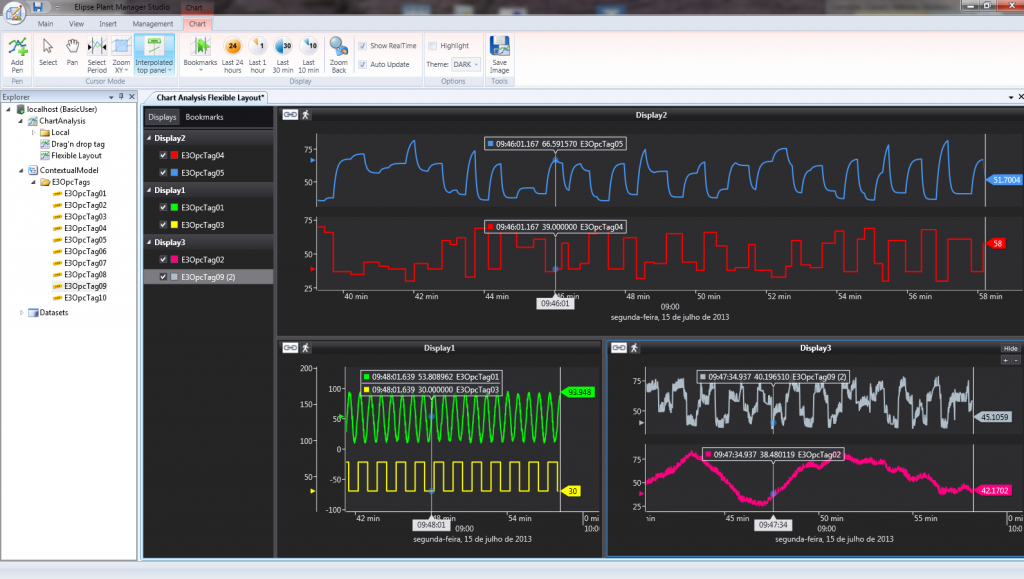
EPM Studio brings process data visualization and analysis together in a single tool. It is also used to manage and maintain the system, according to each user’s or group’s permission level, which makes it a highly versatile tool.
With a modern look and intuitive features, EPM Studio is easy to learn and delivers effective results quickly. One of its key advantages is the integrated analysis environment, which runs Python scripts so you can work with large volumes of data from a single point. This directly cuts the time spent on analysis.
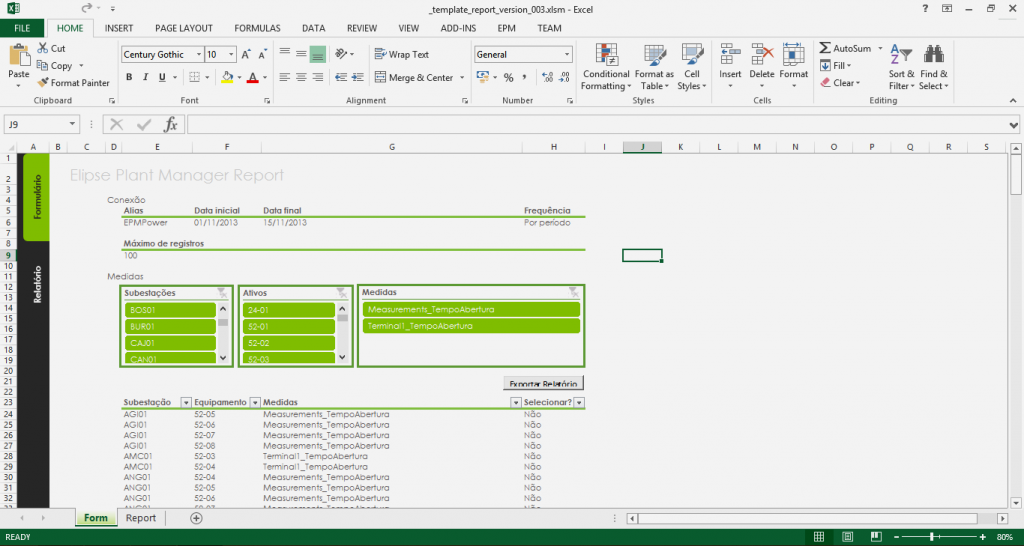
Full integration between EPM and Microsoft Excel®.
The EPM Add-in installs as a Microsoft Excel component. It makes it easy to query process data and, when needed, write data back to EPM. It also provides tools for configuring and maintaining the EPM system directly from a spreadsheet.
The add-in offers two integration options, each based on a different Microsoft Excel technology:
- EPM Automation: installs only the functions for querying EPM Server, which can be entered in spreadsheet cells
- EPM VSTO: adds an EPM tab to the Excel ribbon, making it easier to create tables and charts
EPM Data Model is an EPM module that automatically imports plant operation data from Elipse E3 and Elipse Power and replicates their data structure.
The module brings direct gains, such as data that stays continuously up to date and a range of features for searching, processing, and visualizing relevant information. It also lets you build a data processing system that expands automatically, with reports and dashboards, eliminating the need for additional development or adaptation costs.
“After implementing EPM at the Santo Antônio Hydroelectric Power Plant, we could access information more easily, which helped us make faster, more accurate decisions. We needed to get operational data from the turbines faster, and we achieved that thanks to the Elipse platform.”
Elipse Plant Manager success stories
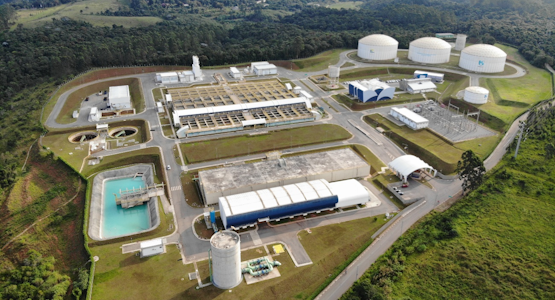 São Lourenço Production System (SPSL) makes confident, informed decisions, acts more efficiently with Elipse Plant Manager
Platform by Elipse Software runs graphical analysis of equipment and variables at São Lourenço Production System for water intake and treatment in Vargem Grande Paulista (SP)
Read more →
São Lourenço Production System (SPSL) makes confident, informed decisions, acts more efficiently with Elipse Plant Manager
Platform by Elipse Software runs graphical analysis of equipment and variables at São Lourenço Production System for water intake and treatment in Vargem Grande Paulista (SP)
Read more →
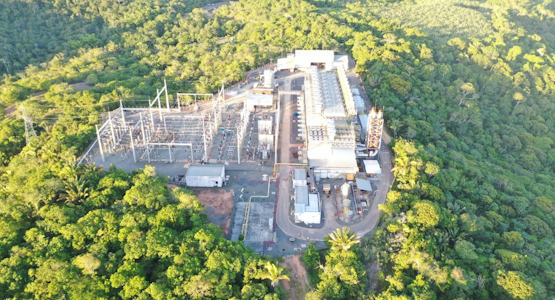 Elipse Plant Manager optimizes tracking of processes at Recôncavo Energia
The platform by Elipse Software streamlines Recôncavo Energia’s data retrieval from natural gas wells that supply Imetame Termelétrica’s four plants
Read more →
Elipse Plant Manager optimizes tracking of processes at Recôncavo Energia
The platform by Elipse Software streamlines Recôncavo Energia’s data retrieval from natural gas wells that supply Imetame Termelétrica’s four plants
Read more →
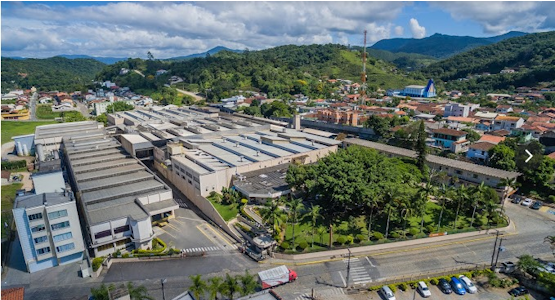 Elipse Plant Manager and Elipse E3 facilitate preventive maintenance at ZEN S.A. for a more efficient production
Elipse Software’s platforms monitor different pieces of equipment at automotive manufacturer ZEN S.A., stave off high maintenance costs of up to U$ 15 thousand per month
Read more →
Elipse Plant Manager and Elipse E3 facilitate preventive maintenance at ZEN S.A. for a more efficient production
Elipse Software’s platforms monitor different pieces of equipment at automotive manufacturer ZEN S.A., stave off high maintenance costs of up to U$ 15 thousand per month
Read more →
 EMAE cuts the number of screens controling the Henry Borden Plant by 90% thanks to Elipse Power
Retrofitting and implementing Elipse Software’s platform allows EMAE to control its plant via 30 screens instead of the previous 475, thus optimizing the operation
Read more →
EMAE cuts the number of screens controling the Henry Borden Plant by 90% thanks to Elipse Power
Retrofitting and implementing Elipse Software’s platform allows EMAE to control its plant via 30 screens instead of the previous 475, thus optimizing the operation
Read more →
Related news
 Elipse Software celebrates 40 years of history
01/10/2026
Four decades after being founded by five young workmates in Porto Alegre, Brazil, the company has become a leading name in SCADA software worldwide
Elipse Software celebrates 40 years of history
01/10/2026
Four decades after being founded by five young workmates in Porto Alegre, Brazil, the company has become a leading name in SCADA software worldwide
 Elipse Drivers 12 – August/2026
19/08/2026
Check out the latest developments for Elipse drivers
Elipse Drivers 12 – August/2026
19/08/2026
Check out the latest developments for Elipse drivers
 Elipse Plant Manager version 7.0: more autonomy for assets management
26/05/2026
The platform by Elipse Software was updated to improve process monitoring, thus optimizing the generation of indicators and real-time data analysis
Elipse Plant Manager version 7.0: more autonomy for assets management
26/05/2026
The platform by Elipse Software was updated to improve process monitoring, thus optimizing the generation of indicators and real-time data analysis
 Elipse Drivers 11 – May/2026
15/05/2026
Check out the latest developments for Elipse drivers
Elipse Drivers 11 – May/2026
15/05/2026
Check out the latest developments for Elipse drivers
